
Picture this: I’m sitting at my desk, coffee in hand, ready to dive into some online shopping, only to have a website load slower than my grandma’s old dial-up connection from the ’90s. Frustrating, right? It’s moments like these that make me appreciate the magic of a speedy site. If you’re running a website, whether it’s a blog about the latest memes or an e-commerce store, optimizing loading times isn’t just techie talk—it’s about keeping your visitors happy and coming back for more. Today, we’re chatting about ways to optimize website loading times in a laid-back way, like we’re just hanging out and sharing tips over virtual coffee.
Optimizing website loading times boils down to making your site snappier so users don’t bounce off in annoyance. In essence, it’s about tweaking elements to ensure pages load quickly, enhancing user experience and even boosting your SEO rankings. Think of it as giving your website a turbo boost—after all, studies show that even a one-second delay can slash conversions by up to 7%. So, if you’re aiming to keep folks engaged, let’s roll up our sleeves and explore some straightforward strategies.
The Real Deal: Why Speed Matters in the Digital World
You know that feeling when you’re waiting for a page to load, and you’re tempted to check your phone or just give up? That’s exactly what happens to visitors on slow sites. From my own escapades, I once abandoned a travel booking site because it took forever to show options—ended up going with a competitor that loaded in a flash. In the realm of internet tutorials, speed isn’t a luxury; it’s a necessity. Google loves fast sites too, favoring them in search results, which means better visibility for your content. Plus, with mobile users on the rise—think quick scrolls on TikTok or Instagram—ensuring your site performs well on all devices is key to staying relevant in today’s meme-filled online culture.
Let’s not forget the emotional side. A sluggish website can feel like a betrayal of trust, especially if you’re sharing valuable tutorials. Imagine teaching someone how to code their first app, only for the page to crawl. It’s disheartening. By optimizing, you’re not just fixing code; you’re building a smoother path for knowledge sharing, making the web a friendlier place.
Expert advice on avoiding phishing scamsEasy Tweaks for a Quicker Ride
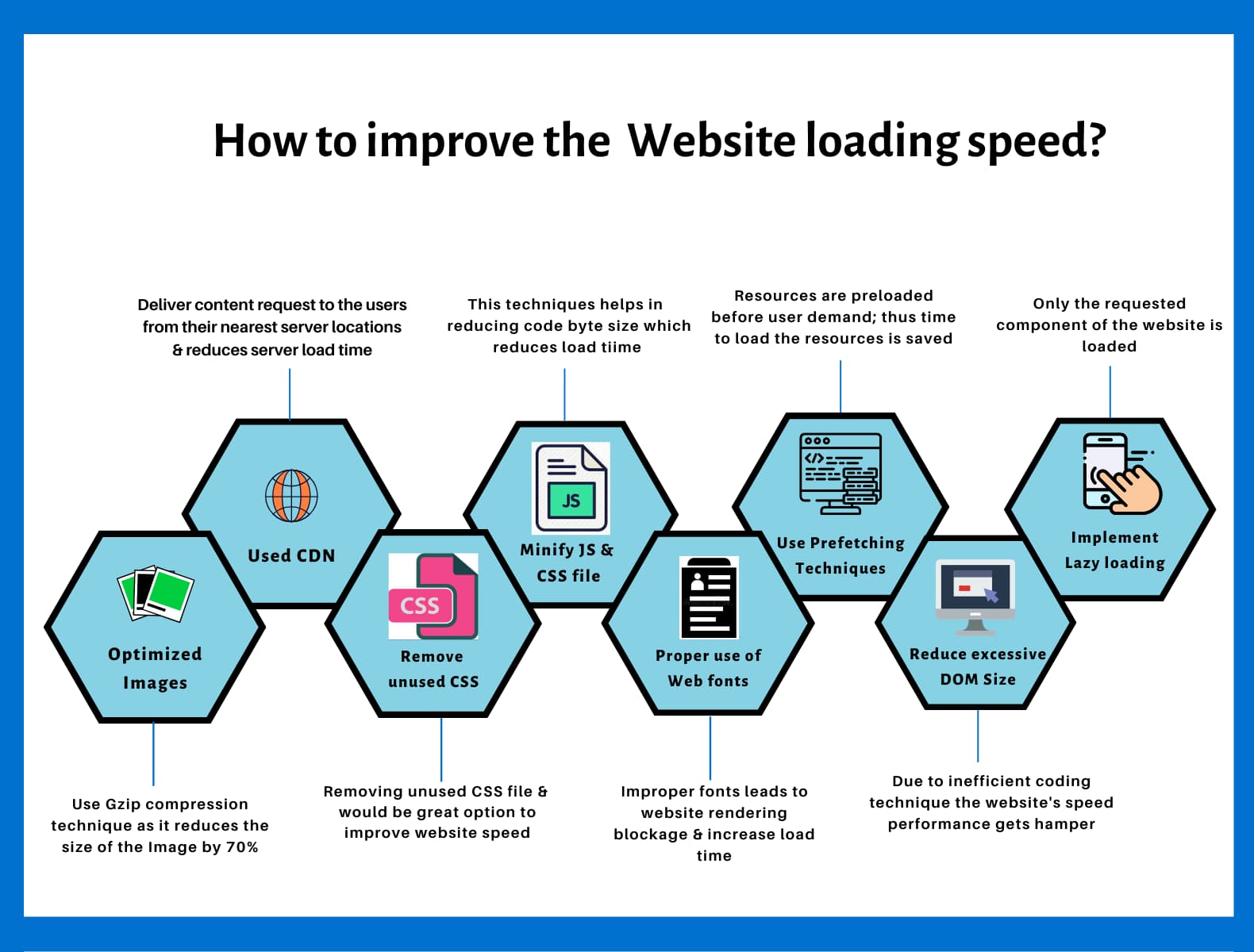
Alright, let’s get into the fun part—simple ways to speed things up without needing a computer science degree. First off, compress your images. I mean, who needs a massive file of that cat meme when a smaller version does the trick? Tools like TinyPNG can shrink those files without losing quality, cutting down load times significantly. It’s like decluttering your digital closet; everything runs smoother.
Another quick win? Enable browser caching. This lets returning visitors load pages faster by storing elements locally. Think of it as your browser remembering your favorite coffee order. For WordPress users, plugins like WP Rocket make this a breeze. And don’t overlook minifying CSS and JavaScript—it’s basically removing the fluff, like editing out unnecessary words in a story to keep it punchy.
Going Deeper: Advanced Optimization Tricks
Once you’ve nailed the basics, let’s amp it up with some more sophisticated moves. Ever heard of a Content Delivery Network (CDN)? It’s like having multiple delivery drivers for your pizza—your content gets served from the closest server to the user, slashing load times. I remember switching to a CDN for my side blog; suddenly, readers from across the globe were zipping through tutorials without a hitch.
Then there’s optimizing your database. If you’re on platforms like Joomla or Drupal, regularly cleaning up unused data can work wonders. It’s akin to spring cleaning your room—gets rid of the dust and makes everything accessible. Oh, and for the tech-savvy, implementing lazy loading means images and videos only load when they’re needed, not all at once. Picture a buffet where you only pick what you want, saving time and resources.
In-depth look at HTTPS versus HTTP protocolsStep-by-Step: Your Optimization Adventure
Ready to put this into action? Let’s break it down with a simple guide. First, 1 audit your current site speed using tools like Google PageSpeed Insights. It’ll give you a scorecard and suggestions—think of it as a friendly critique from a mentor.
Next, 2 tackle images and media. Compress them and use responsive formats. For videos, host them on YouTube or Vimeo to offload the weight from your server.
Then, 3 optimize your code. Minify files and remove any plugins you don’t need; they’re like extra baggage on a road trip.
Finally, 4 test and monitor. Use real-user monitoring tools to see how actual visitors experience your site, and adjust as needed. It’s an ongoing journey, not a one-and-done deal.
Practical tips for safe online shopping| Tool | Best For | Why Use It |
|---|---|---|
| GTmetrix | Beginners | Provides detailed reports with easy fixes for loading issues. |
| WebPageTest | Advanced Users | Allows custom testing from various locations, mimicking global users. |
| Pingdom | Real-time Monitoring | Alerts you to downtime and performance dips before they affect visitors. |
Wrapping Up with Some Final Thoughts
As we wrap this up, imagine your website as a cozy hangout spot—everyone wants to linger if it’s welcoming and efficient. By optimizing loading times, you’re not just fixing tech; you’re crafting an experience that resonates. So, what’s your next move? Maybe experiment with these tips and see how your site transforms. Who knows, you might just become the go-to guru for internet tutorials.
FAQ: Quick Answers to Common Questions
How long should a website take to load? Ideally, under 2-3 seconds for a smooth experience. Anything longer, and you risk losing visitors, especially on mobile.
Does website speed affect SEO? Absolutely—Google factors in site speed for rankings, so faster sites often climb higher in search results.
Is optimizing worth the effort for small sites? For sure! Even for personal blogs, it improves user satisfaction and can lead to more shares and engagement.
Strategies for effective keyword research basics