
Ever had that heart-sinking moment when you click “buy now” and suddenly wonder if your bank account is about to get raided by digital bandits? Yeah, me too—last year, I almost fell for a too-good-to-be-true deal on what I thought was a legit site, only to spot the red flags just in time. It’s moments like these that make safe online shopping feel like navigating a busy street blindfolded. But don’t worry, I’ve got your back with some down-to-earth, practical tips that turn this potential minefield into a breezy walk in the park.
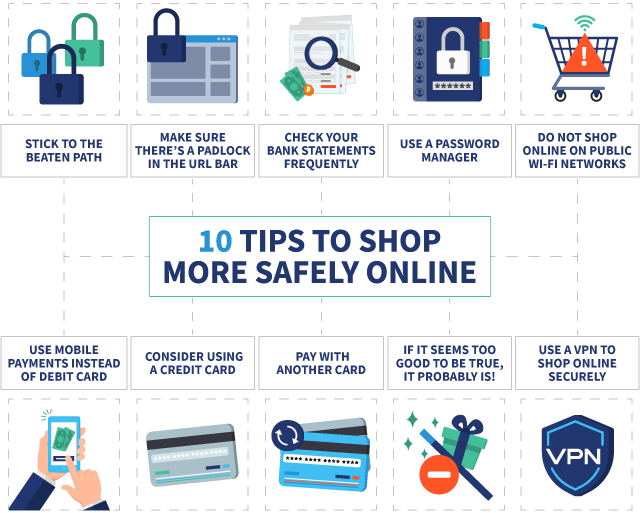
Practical tips for safe online shopping boil down to being a savvy digital citizen: always verify, protect your info, and stay alert. In essence, start by checking for HTTPS locks, use strong passwords, and avoid public Wi-Fi for transactions. These steps can shield you from scams and ensure your hard-earned money stays yours—about 40 million people fall victim to online fraud annually, so let’s not join that club. By following these strategies, you’ll shop with confidence and peace of mind, making every purchase a secure win.
Let’s dive deeper into why this matters. Online shopping is like that friend who’s always got the coolest stuff but sometimes drags you into shady spots. We’ve all been there, scrolling through endless deals, tempted by flash sales that pop up on social media feeds. But here’s the thing: with e-commerce booming, so are the cyber threats. From phishing emails disguised as order confirmations to fake websites that mimic your favorite stores, it’s a wild west out there. I once shared a laugh with a buddy over a meme about “free” gadgets that end up costing your identity—it’s funny until it’s not. So, arming yourself with these tips isn’t just smart; it’s essential for that relaxed vibe we all crave when hunting for bargains.
Spotting the Sneaky Risks in Your Digital Cart
Before we get to the good stuff, let’s chat about the baddest actors in this play. Cybercriminals are crafty, using tactics like installing malware through dodgy downloads or tricking you with urgent pop-ups that scream “Limited time offer!” Imagine you’re at a flea market—would you hand over your wallet to a stranger in a dark corner? Probably not, so why do it online? A key red flag is websites without that little padlock icon in the address bar; it’s like leaving your front door wide open. And oh, those too-good-to-be-true prices? They’re often bait, luring you into traps. By recognizing these, you’re already one step ahead, turning potential pitfalls into mere speed bumps on your shopping spree.
Strategies for effective keyword research basicsEssential Steps to Lock Down Your Online Buys
Alright, time for the fun part—let’s break this down into actionable steps that’ll make you feel like a pro. We’ll keep it light and straightforward, no overwhelming lists here. First off:
1Always double-check the URL. Make sure it starts with HTTPS and looks exactly like the official site. Typos like “amason.com” instead of “amazon.com” are dead giveaways for fakes—think of it as spotting a counterfeit bill before it’s too late.
2Use a secure payment method, like credit cards over debit, because they offer better fraud protection. Services like PayPal add an extra layer, acting as a buffer between your money and potential scammers—it’s like having a bouncer at the club door.
3Keep your devices updated and use antivirus software. Outdated apps are like unlocked windows; hackers love sneaking in. Remember that time a viral TikTok video warned about unpatched phones? It’s not just hype—it’s real talk for safer browsing.
Errors to avoid in basic website designAnd don’t forget to shop only on reputable sites. If a deal seems fishy on social media, verify it directly on the brand’s official page. Mixing these with strong, unique passwords for each account will keep your info safer than a secret recipe in a locked vault.
Comparing Secure Sites: A Quick Cheat Sheet
To make things even easier, here’s a simple table comparing what makes a site trustworthy versus one to avoid. It’s like weighing pros and cons before picking a movie—helps you decide fast.
| Feature | Secure Site | Risky Site |
|---|---|---|
| URL Security | Always HTTPS with a padlock | HTTP or no padlock, weird domains |
| Payment Options | Multiple secure methods like Visa, PayPal | Only cryptic bank transfers or gift cards |
| Customer Reviews | Verified and abundant on trusted platforms | Few or suspiciously glowing ones |
| Contact Info | Clear physical address and phone | Vague or missing details |
This breakdown shows why sticking to the left column keeps your shopping sessions stress-free. It’s all about building that instinct, like learning to read a room at a party.
What If Things Go South? Your Backup Plan
Even with the best intentions, stuff happens—maybe a package never arrives or you spot unauthorized charges. Don’t panic; handle it like a pro. First, contact your bank or card issuer immediately; they’re often equipped to reverse fraudulent transactions. Then, report the issue to platforms like the FTC or local consumer protection agencies. I recall a friend who turned a scam attempt into a win by sharing her story on Reddit, which not only got her money back but also warned others. It’s a reminder that community and quick action can turn a bad day around, keeping your online world a bit more humane.
Comparative analysis of popular email servicesA Few Extra Nuggets for Peace of Mind
Beyond the basics, consider using a VPN on public Wi-Fi—it’s like putting on sunglasses in a storm. And always log out after shopping; leaving sessions open is as careless as leaving your keys in the car. These little habits add up, making safe online shopping second nature without sucking the joy out of finding that perfect deal.
Frequently Asked Questions
Q1: How can I tell if an email is a phishing attempt? Look for poor grammar, urgent language, or requests for personal info. Always hover over links to check the URL before clicking—it’s a quick way to avoid the bait.
Q2: Is mobile shopping as safe as on a computer? Absolutely, as long as you use secure apps and keep your phone updated. But be wary of public networks; they can expose your data like an open book.
Q3: Should I use the same password everywhere? No way! Use a password manager to create unique ones; it’s like having a different key for every door, keeping intruders out for good.
Innovative ideas for viral content creation onlineAs we wrap up this chat, think about how these tips can transform your next online hunt into a thrilling adventure rather than a risky gamble. What if you made safe shopping your new habit, turning every click into a confident stride? Go on, give it a try—you might just discover that the best deals are the ones that stick around without the drama.