
Ever since I first dipped my toes into building websites back in my college days, I’ve always been amazed at how a good content management system can turn a jumbled mess of code into something sleek and user-friendly. Picture this: me, caffeine-fueled at 2 a.m., trying to update a site manually and pulling my hair out over broken links. That’s when I discovered CMS tools—game-changers that make web tutorials a breeze. In this overview of effective content management systems, we’ll chill out and explore how these platforms can supercharge your web projects, especially if you’re knee-deep in creating online tutorials.
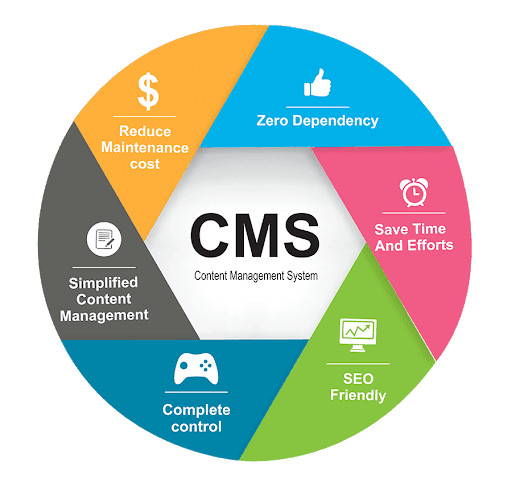
So, what’s the deal with CMS? At its core, a content management system is like that trusty Swiss Army knife in your digital toolkit—it lets you create, manage, and modify your website content without needing to be a coding wizard. Think of it as your website’s behind-the-scenes crew, handling everything from text and images to plugins and SEO tweaks. For folks in the web tutorials space, like teachers or bloggers sharing coding tips, a solid CMS means you can focus on crafting killer content instead of wrestling with HTML nightmares. According to a quick scroll through industry chats, over 60% of websites use some form of CMS, proving it’s not just a trend but a staple for effective web tutorials.
Effective content management systems aren’t one-size-fits-all; they’re tailored to make your life easier. Let’s break it down—imagine you’re building a series of web tutorials on JavaScript basics. A good CMS lets you organize lessons into neat categories, embed videos effortlessly, and even schedule posts for that perfect release timing. It’s like having a personal assistant who handles the grunt work while you shine as the expert. I remember my first tutorial site; switching to WordPress felt like upgrading from a bicycle to a sports car—no more manual uploads, just smooth sailing.
Why Pick a CMS for Your Web Tutorials?
In the world of web creation, a CMS is your secret weapon for efficiency and creativity. It streamlines workflows, allowing you to collaborate with others—say, if you’re teaming up with a designer for those interactive tutorial elements. Plus, with built-in security features, you won’t lose sleep over hackers messing with your hard-earned content. From a relaxed perspective, it’s all about freeing up your brain space; no more stressing over backend updates when you could be dreaming up the next big tutorial on responsive design. Web tutorials thrive on fresh, accessible content, and a CMS ensures your site stays dynamic and user-friendly.
Building a portfolio website from scratchOne underrated perk? Customization. Whether you’re into open-source options or user-friendly drag-and-drop interfaces, there’s a CMS that matches your vibe. I once jazzed up a tutorial site with custom themes, and it was as fun as rearranging furniture in a cozy apartment. But here’s the key takeaway in about 50 words: Effective CMS platforms empower creators to build and manage web tutorials efficiently, offering intuitive tools for content editing, SEO optimization, and audience engagement, ultimately saving time and reducing technical headaches for anyone diving into online education.
Top CMS Contenders: A Quick Compare
When it comes to choosing a CMS for your web tutorials, it’s like picking your favorite coffee—everyone has a preference. Let’s look at a few popular ones without getting too bogged down in tech jargon. WordPress is the crowd-pleaser, perfect for beginners with its vast plugin library. Then there’s Joomla, which offers more flexibility for complex sites, and Drupal, the powerhouse for customized, scalable projects. To make this easier, here’s a simple table comparing these based on ease of use, cost, and tutorial-friendly features:
| CMS | Ease of Use | Cost | Best for Web Tutorials |
|---|---|---|---|
| WordPress | High (user-friendly dashboard) | Free (with premium add-ons) | Blog-style tutorials and multimedia integration |
| Joomla | Medium (requires some learning) | Free | Interactive courses with extensions |
| Drupal | Low (more advanced setup) | Free | Custom tutorial platforms with high security |
This isn’t an exhaustive list, but it gives you a relaxed starting point. Whichever you choose, remember it’s about enhancing your web tutorials without overwhelming your daily routine.
Getting Hands-On: A Basic CMS Tutorial
Alright, let’s roll up our sleeves and dive into a simple tutorial to get you started with a CMS like WordPress—ideal for web enthusiasts. This isn’t a full course, but it’ll give you that “aha” moment. First off, head to the WordPress site and download it, or use a hosting service that has it pre-installed. It’s like unpacking a new gadget; exciting but straightforward.
Tips for improving website search rankings1Install WordPress on your server or local environment. Follow the setup wizard—it’s as easy as entering your site details and database info. Think of it as planting a seed for your tutorial garden.
2Log into your dashboard and explore the interface. Create your first post by clicking “Posts” and then “Add New.” Here, you can add text, images, and even embed code snippets for your web tutorials—pure magic for sharing tips on HTML or CSS.
3Customize your theme to match your tutorial style. Pick a responsive design so your content looks great on any device, then add plugins for SEO or interactive elements. It’s like decorating your space to make learning more inviting.
By the end of this, you’ll have a basic site up and running, ready for your web tutorials. It’s that simple—once you get past the initial setup, it’s smooth cruising.
Understanding RESTful API integrationsPro Tips for Mastering Your CMS
To keep things flowing in a relaxed tone, let’s chat about some insider tips. Always back up your site regularly; I learned that the hard way after a plugin glitch wiped out a week’s worth of tutorial content. Also, integrate analytics to see how your audience engages with your web tutorials—it’s like getting feedback from a friend over coffee. And don’t forget to explore communities on Reddit or forums; sharing stories there can spark fresh ideas, much like swapping recipe hacks at a potluck.
In wrapping up this journey through effective content management systems, imagine the possibilities when your web tutorials are backed by the right tools—more time for creativity, less for tech troubles. What if you turned your next tutorial into a community hub, fostering discussions and growth? It’s all within reach with the right CMS setup.
FAQ
Q: What’s the best CMS for beginners creating web tutorials? A: WordPress is often the go-to for newcomers due to its intuitive interface and extensive resources, making it easy to start sharing your web knowledge without a steep learning curve.
Q: Can I use a CMS for free? A: Absolutely, options like WordPress and Joomla are free to download and use, though you might need to pay for hosting or premium features as your web tutorials grow.
Pros and cons of static site generators