
Ever had that moment when you’re trying to connect two apps, and it feels like they’re speaking different languages? Picture this: I’m sitting at my desk, coffee in hand, staring at my latest web project. I needed to pull data from a weather API to make my app more dynamic, but oh boy, the integration part had me scratching my head at first. That’s the beauty of RESTful API integrations—they’re like the universal translators of the web world. In this chill guide, we’ll dive into understanding RESTful API integrations, breaking it down in a way that’s easygoing and practical, perfect for anyone dipping their toes into web tutorials.
So, what’s the core of understanding RESTful API integrations? It’s all about knowing how to make your web app talk smoothly to external services using simple HTTP requests. In about 50 words: RESTful APIs let you fetch, create, update, or delete data over the internet by sending requests to specific endpoints, using methods like GET or POST, which makes integrating them into your web projects straightforward and efficient for building interactive applications. This approach ensures your app stays lightweight and scalable without reinventing the wheel.
The Laid-Back Lowdown on RESTful APIs
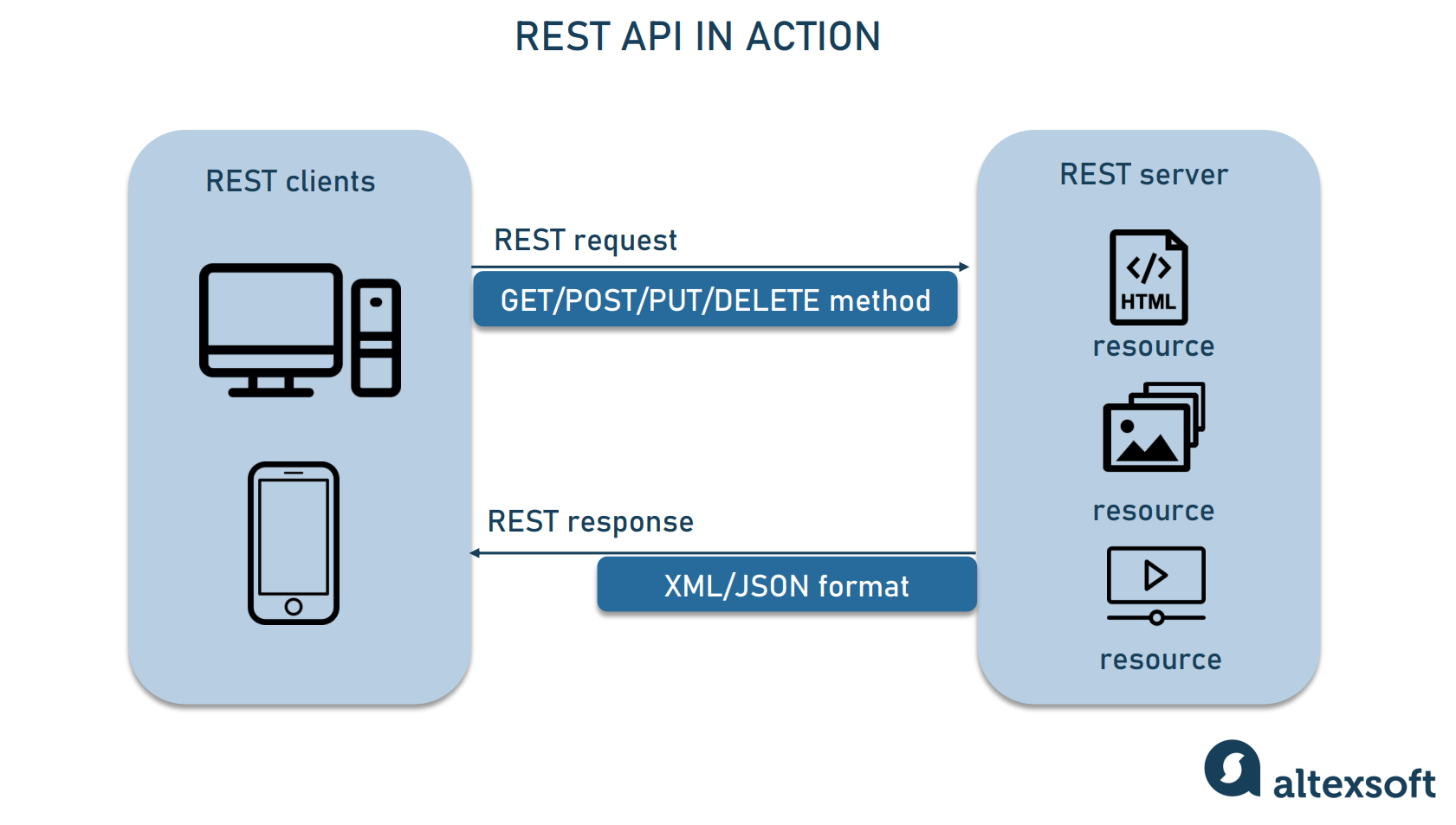
Let’s kick things off with the basics—no fancy jargon, just straight talk. A RESTful API, or Representational State Transfer API, is essentially a set of rules that lets different software systems communicate over the web. Think of it like ordering food from your favorite app; you send a request (hey, I want a pizza), and the server responds with your meal. In web tutorials, this is gold because it allows your site to pull in real-time data, like stock prices or social media feeds, without building everything from scratch.
What’s cool is how REST relies on standard HTTP methods. RESTful API integrations use verbs like GET to retrieve data, POST to send new info, PUT or PATCH to update existing stuff, and DELETE to remove it. It’s all about stateless interactions, meaning each request from your web app stands on its own, which keeps things simple and reliable. I remember my first integration; it was messy until I grasped that every call needed to include all the necessary details—no relying on previous chats.
Pros and cons of static site generatorsHow Integrations Actually Work in Web Projects
Diving deeper, integrating a RESTful API into your web tutorial means hooking it up to your frontend or backend code. It’s like inviting a friend to a party—you need to know their preferences and how to connect. Most APIs use JSON (JavaScript Object Notation) for data exchange, which is basically a neat way to structure information that your JavaScript can easily parse.
For instance, if you’re building a blog with dynamic comments from a third-party service, you’d send a GET request to their endpoint. In a relaxed web tutorial vibe, imagine you’re crafting a recipe app; you might use a RESTful API integration to fetch ingredients from a database API. The key is handling responses gracefully—deal with errors like 404s (not found) or 401s (unauthorized) without crashing your app. Pro tip: Always check the API’s documentation; it’s like the map to your treasure hunt.
Step-by-Step: Rolling Up Your Sleeves for Integration
Alright, let’s get hands-on. Here’s a straightforward guide to integrating a RESTful API into your web project. We’ll keep it light and sequential, like following a favorite podcast episode.
1First, pick your API and sign up if needed. For example, grab an API key from a service like OpenWeatherMap. This is your golden ticket to access their data endpoints.
Customizing themes in popular CMS2Understand the endpoints and methods. Read the docs to know what URLs to hit and which HTTP methods to use. A GET request might look like fetching weather data with parameters for location.
3Set up your code. In JavaScript, use Fetch API or Axios to make requests. For a simple GET, you’d write something like fetch(‘https://api.example.com/data’).then(response => response.json()).then(data => console.log(data)).
4Handle authentication if required. Many APIs need headers with API keys or tokens—add them to your requests to avoid those pesky access denied errors.
5Test and debug. Use tools like Postman or your browser’s dev tools to see what’s going wrong. It’s like debugging a recipe—taste as you go.
Debugging common errors in web developmentWhy It’s Worth the Effort: Perks and Potential Hiccups
Integrating RESTful APIs isn’t just techie fun; it supercharges your web tutorials by making them interactive and current. Understanding RESTful API integrations opens doors to features like user authentication via OAuth or real-time updates, which can turn a static site into a dynamic powerhouse. But hey, it’s not all smooth sailing—common issues include rate limits (too many requests and you’re blocked) or CORS errors (cross-origin resource sharing headaches).
To compare, here’s a quick table on HTTP methods you might use:
| Method | What It Does | Best For |
|---|---|---|
| GET | Retrieves data | Fetching user profiles or news feeds |
| POST | Sends new data | Submitting forms or creating accounts |
| PUT/PATCH | Updates existing data | Editing user info or refreshing content |
| DELETE | Removes data | Deleting posts or clearing caches |
In my own projects, I’ve turned potential frustrations into “aha” moments by logging requests and responses—it’s like journaling for your code.
Wrapping It Up with a Real-World Spin
From e-commerce sites pulling product data to social apps sharing feeds, RESTful API integrations are everywhere in web tutorials. They make your work feel alive, like adding spices to a dish. As you tinker, remember that slip-ups are part of the journey; they lead to sharper skills and cooler builds.
Integrating social media into your siteQuick FAQ for the Curious
What is the difference between REST and SOAP APIs? REST is lightweight and uses HTTP directly, making it easier for web integrations, while SOAP is more rigid with XML and better for enterprise-level security needs.
How do I secure my RESTful API integrations? Always use HTTPS, implement authentication like API keys or JWT, and validate inputs to prevent vulnerabilities—it’s like locking your digital front door.
Can beginners handle RESTful API integrations? Absolutely! Start with simple tutorials using free APIs; it’s a gentle curve that builds confidence, much like learning to ride a bike without training wheels.
As we wrap this up, think about how you’ll use this knowledge to jazz up your next web project—maybe integrate that dream API you’ve been eyeing. What are you waiting for? Dive in and see the magic unfold.