
Ever thought about spilling your thoughts into the digital wild? I remember my first blog like it was yesterday – a quirky corner of the web where I rambled about my love for hiking and bad coffee. It started as a fun experiment, but soon it became my go-to spot for connecting with folks who shared my passions. If you’re itching to do the same, setting up a personal blog is easier than you might think. It’s like building a treehouse in your backyard; a bit of planning, some tools, and voilà, you’ve got your own online haven.
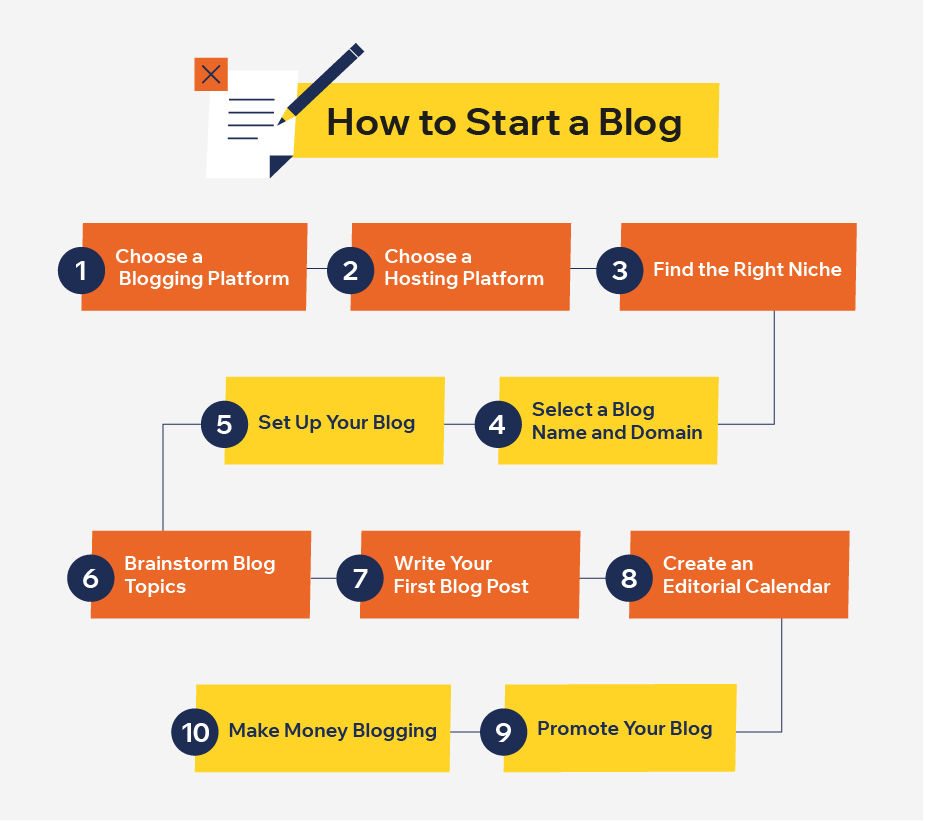
Setting up a personal blog boils down to a few key steps that anyone can follow, even if you’re not a tech wizard. In essence, you’ll choose a platform, grab a domain name, sort out hosting, and customize your space to reflect your style. This process empowers you to share stories, expertise, or just daily musings with the world, fostering connections in our vast internet playground. With a relaxed approach, you’ll be live in no time, turning your ideas into engaging content that resonates.
Diving deeper, let’s break this down. First off, why bother with a blog? In today’s online tutorial world, blogs aren’t just diaries; they’re powerful tools for personal growth, networking, and even monetization. Picture this: you’re a photography enthusiast wanting to showcase your shots. A blog lets you do that while attracting like-minded adventurers. It’s not about perfection; it’s about starting somewhere. I once met a blogger who turned his simple site into a community hub – all from his couch. So, grab that coffee, and let’s get into the nitty-gritty of how to create a blog online.
Pick the Perfect Blogging Platform
Choosing a platform is like picking the right pair of shoes for a hike – it has to fit your stride. There are plenty of user-friendly options out there, from WordPress to Blogger or even Squarespace. WordPress stands out for its flexibility; it’s like a Swiss Army knife for bloggers, offering thousands of themes and plugins to jazz things up. If you’re aiming for something simpler, Medium is great for beginners since it handles the tech stuff, letting you focus on writing.
Tips on improving your internet security basicsConsider your needs: Do you want e-commerce features or just pure storytelling? WordPress.org is ideal for full control, but it requires a bit more setup, while WordPress.com is more plug-and-play. I’ve tinkered with both, and honestly, starting with a free option can spark that creative fire without the pressure. Remember, the best platform for personal blogs is one that aligns with your tech comfort level and future goals.
Gather Your Essentials: Domain and Hosting
Once you’ve got your platform sorted, it’s time to claim your digital real estate. A domain name is your blog’s address – think something memorable like “MyDailyAdventures.com”. Keep it short, relevant, and easy to spell; avoid numbers or hyphens if possible. Services like GoDaddy or Namecheap make this straightforward, often with domain search tools to check availability.
Hosting is where your site lives online. It’s like renting a spot for your treehouse. Shared hosting is budget-friendly for starters, while VPS offers more power as you grow. I recommend checking out Bluehost or SiteGround; they’re reliable and beginner-friendly. Pro tip: Look for bundles that include domain registration and free SSL certificates for security. Setting this up might feel daunting, but most providers have guides that walk you through it step by step.
Step-by-Step Installation and Customization
Now, let’s roll up our sleeves and get practical. Here’s how to bring your blog to life, broken down into easy bites. We’ll use WordPress as an example since it’s a top choice for internet tutorials on blogging.
Best strategies for social media engagement1Head to the WordPress website and sign up for a new account or download the software if you’re going self-hosted. This is your foundation, so take a moment to explore the dashboard – it’s surprisingly intuitive, like navigating a familiar app.
2Connect your domain to your hosting. Log into your hosting dashboard, point your domain to the server, and install WordPress with one-click options. It’s like linking puzzle pieces; once done, your site starts taking shape.
3Customize your theme and add plugins. Pick a free theme from the WordPress library to give your blog a fresh look, then install essentials like Yoast SEO for optimizing your posts. Think of plugins as add-ons that supercharge your site without much hassle.
4Create your first post! Write something genuine, hit publish, and watch it go live. Don’t overthink it; even a simple “Hello, world!” can be a starting point, evolving into deeper content as you find your rhythm.
Common mistakes in online password management5Test and tweak. Browse your site on different devices, check for broken links, and adjust as needed. It’s an ongoing process, much like tending a garden – a little maintenance goes a long way.
Tips to Keep It Fresh and Engaging
Once your blog is up, the real fun begins. To make it stand out in the sea of online tutorials, infuse it with your personality. Share anecdotes, like how a rainy day inspired your first post, or reference pop culture – imagine tying in a meme from your favorite show to lighten up a tutorial. Avoid common pitfalls, such as neglecting SEO; use tools to incorporate keywords naturally, like “steps for setting up a personal blog” without stuffing them in.
Engage your audience by responding to comments and collaborating with other bloggers. It’s all about building a community, not just broadcasting. Oh, and don’t forget backups – losing content is like misplacing your favorite notebook; prevent it with regular saves.
As you wrap your head around this, imagine the stories you’ll tell. Your blog could become that virtual coffee shop where ideas brew and friendships form. So, what’s your next move – pen that first post and let the adventure unfold?
Comparing top web browsers for speedFrequently Asked Questions
How much does it cost to set up a personal blog? It can be as low as free with platforms like Blogger, but for a custom domain and hosting, expect $50–$100 annually. Start small and scale as your audience grows.
Do I need to know coding for this? Not at all! Most platforms are drag-and-drop friendly. If you want to dive deeper, free resources online can teach you basics without overwhelming you.
How can I drive traffic to my new blog? Share on social media, guest post on similar sites, and optimize for search engines. Consistency is key – post regularly and engage with your readers to build momentum.