
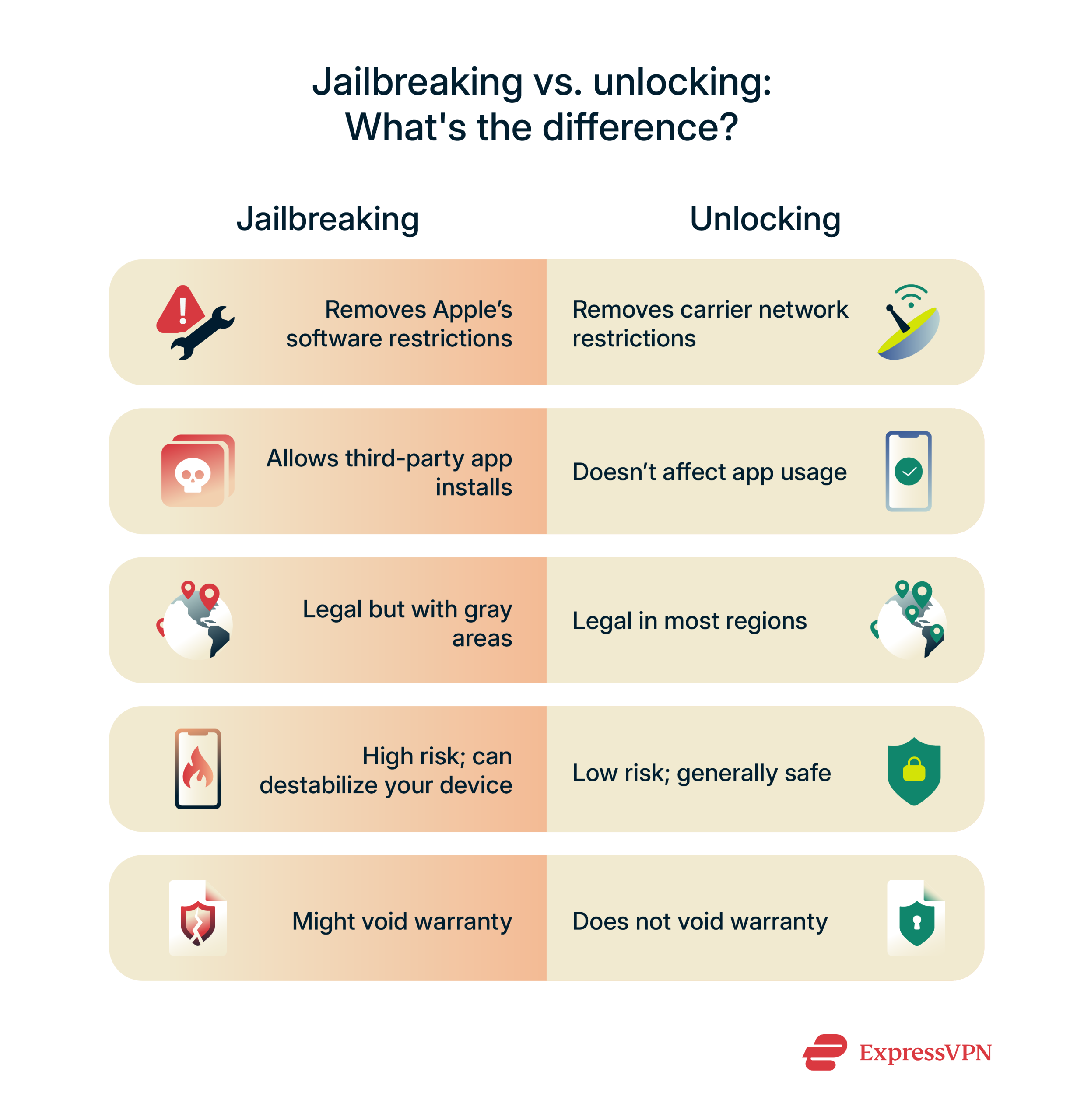
Ever tried jailbreaking your iPhone only to end up with a brick that won’t even boot? Yeah, me too—that one time I fumbled through the process like a cat on a keyboard, and suddenly my device was acting more finicky than a toddler at bedtime. It’s those little slip-ups that turn what should be a cool tweak into a headache, but hey, we’re all learning here. Today, we’re diving into the common errors folks make when jailbreaking iOS devices, straight from the trenches of iOS tinkering. I’ll keep it chill, share some real talk, and maybe throw in a meme reference or two to lighten the mood.
Common errors when jailbreaking iOS can range from simple oversights to major blunders that fry your warranty faster than a viral TikTok dance. But let’s cut to the chase: the biggest mistake is rushing without understanding the risks. In about 50 words, here’s the lowdown—if you’re jailbreaking, always back up your data first, use trusted tools, and stay updated on your iOS version to avoid bricking or security holes that could invite hackers like uninvited party crashers.
Picture this: you’re sitting there with your iPhone, excited to unlock that custom theme or add some killer apps, but one wrong move and poof—it’s a mess. I remember scrolling through Reddit threads late at night, seeing horror stories of people who ignored compatibility checks. It’s like trying to fit a square peg in a round hole; it just doesn’t work. Jailbreaking isn’t as straightforward as updating apps from the App Store; it involves exploiting vulnerabilities, which means timing and precision matter. A lot of newbies dive in without checking if their device model or iOS version is supported, leading to failed installs or worse, a device stuck in recovery mode. To keep things relaxed, think of it as prepping for a road trip: you wouldn’t hit the gas without mapping your route, right?
The Rookie Slip-Ups That Trip Everyone Up
In the world of iOS tutorials, overlooking basic prep is like forgetting your keys at home—frustrating and avoidable. One classic error is not backing up your device before starting. I mean, imagine losing all your photos and messages because you skipped that step; it’s heart-sinking. Another biggie? Using outdated jailbreak tools. Tools like Unc0ver or Taurine evolve quickly, and grabbing an old version is like wearing last season’s fashion—it might work, but it’s risky. Folks often get lured by shady download sites promising the latest and greatest, only to inject malware. Yikes. And let’s not forget the impatience factor; interrupting the process midway can corrupt your system files, turning your shiny iPhone into a paperweight.
Comparing iOS and Android user interfacesFrom my own escapades, I once tried jailbreaking on a whim during a long flight, without stable Wi-Fi. Big mistake. The connection dropped, and I ended up with a half-done job that required a full restore. It’s those everyday blunders that make you appreciate the pros who share detailed guides on forums. If you’re into iOS modding, always cross-reference multiple sources—it’s like getting a second opinion before a haircut.
How These Errors Mess With Your Device’s Health
When errors pile up, your iPhone doesn’t just slow down; it can straight-up malfunction. For instance, incompatible jailbreaks might drain your battery faster than scrolling through endless Instagram reels, or cause random crashes that make you question your life choices. Security-wise, exposing your device to unverified tweaks is like leaving your front door wide open—data thieves could waltz right in. Apple doesn’t play around with jailbreaking because it bypasses their safeguards, so errors here often lead to voided warranties or even permanent damage.
To put it in perspective, let’s compare a few popular jailbreak methods in this quick table. It’s not exhaustive, but it highlights why choosing wisely matters:
| Jailbreak Tool | Common Error Risk | Best For |
|---|---|---|
| Unc0ver | High if not updated; often leads to boot loops on older iOS | Users on iOS 11-14 who double-check compatibility |
| Taurine | Low, but errors from rushing the install process | Beginners with iOS 14+ who follow step-by-step guides |
| Checkra1n | Medium; hardware-specific issues on certain models | Tech-savvy folks with A7-A11 chips avoiding beta versions |
This shows how one tool’s error might be another’s strength, depending on your setup. Always research like you’re picking a Netflix binge—choose what fits your vibe.
Ideas for customizing iPhone home screenSpotting the Signs Before It’s Too Late
Sometimes, you can catch mistakes early. If your screen freezes during the jailbreak or you see error codes flashing, that’s your cue to hit pause. In iOS tutorials, experts often stress monitoring your device’s temperature—overheating is a red flag, much like that awkward moment when your phone gets too hot in your pocket. Another telltale sign? Apps not launching post-jailbreak, which could mean a conflict with system files. Don’t ignore these; it’s like skipping the doctor when you feel off—things escalate quickly.
To avoid all this, here’s a relaxed guide to safe jailbreaking. First, 1Backup everything using iCloud or iTunes; it’s your safety net. Then, 2Download tools from official sites only, avoiding those sketchy links that pop up in your feeds. Next, 3Follow the exact steps without skipping ahead; think of it as following a recipe for your favorite comfort food. And finally, 4Test tweaks one at a time to pinpoint any issues, like debugging a playlist that won’t play nice.
As we wrap up this chat on iOS jailbreaking woes, I’m left wondering: what’s the wildest tweak you’ve ever tried? Whether it’s a custom icon pack or something more daring, sharing stories keeps the community alive. So, if you’re itching to dive in, grab a coffee, take it slow, and remember—your iPhone’s got your back if you treat it right.
Quick FAQ on iOS Jailbreaking
Is jailbreaking iOS legal? Absolutely, in most places, as long as you’re not using it for piracy. It’s like modding a game—just stay ethical to avoid legal hiccups.
Benefits of iCloud for data backupWhat if I brick my device? Don’t panic; restoring via iTunes often fixes it, but always have a backup. Think of it as a reset button for your digital life.
Should I jailbreak for better performance? Not really; it can actually slow things down if done wrong. Stick to official updates for smooth sailing unless you really need those extras.