
Ever stared at a block of code that looks like a tangled mess of spaghetti, wondering how on earth you got there? Yeah, me too. I’m no stranger to the chaos of late-night coding sessions where everything works but nothing makes sense the next day. As someone who’s spent years building websites and untangling digital knots, I’ve uncovered a few gems that turn sloppy scripts into elegant, maintainable masterpieces. Today, we’re diving into the secrets of writing clean code, especially in the world of web tutorials, where clarity isn’t just nice—it’s essential for turning ideas into user-friendly sites.
Clean code isn’t about being a perfectionist; it’s about making your web projects readable, scalable, and less of a headache for you or anyone who inherits your work. In a nutshell, it’s the difference between a site that crashes under pressure and one that evolves effortlessly. Think of it as tidying your room before a guest arrives—except here, the guest is future-you or a collaborator trying to debug without pulling their hair out. For web developers knee-deep in HTML, CSS, and JavaScript, mastering this can shave hours off debugging and make your tutorials shine with real-world applicability.
One of the biggest secrets to writing clean code in web development is starting with a solid foundation in naming conventions and structure. Imagine you’re crafting a recipe for a cake; if you label ingredients like “flour-thing” instead of “all-purpose-flour,” good luck recreating it. In web tutorials, this means using descriptive variable names that paint a picture without needing a decoder ring. For instance, instead of vague terms like “x” or “temp,” opt for “userInputField” or “navBarHeight.” This simple habit, drawn from my own blunders on a project where I mixed up elements and ended up with a wonky responsive design, can prevent a cascade of errors. It’s like that viral meme of the programmer who finally comments their code after years—suddenly, everything clicks.
Why Clean Code Matters in Web Tutorials
In the bustling ecosystem of web development, clean code isn’t just a best practice; it’s a lifeline. From my early days tinkering with basic HTML pages, I realized that messy code leads to bloated websites that load like molasses and frustrate users. According to industry insights, poorly structured code can increase page load times by up to 30%, which is a big no-no in our fast-paced digital world. But beyond performance, it fosters collaboration—ever tried explaining a jumbled JavaScript function to a team? It’s like playing charades with tech jargon. By keeping things tidy, your web tutorials become more than instructions; they turn into blueprints for success, helping learners build robust sites without the drama.
Evaluating web hosting providersLet’s break this down with a quick comparison. Here’s a simple table showing the contrast between dirty and clean code approaches in a typical web project:
| Aspect | Dirty Code Example | Clean Code Example |
|---|---|---|
| Variable Naming | let a = document.getElementById(‘box’); | let mainContentBox = document.getElementById(‘main-content-box’); |
| Function Structure | A long function doing everything at once. | Modular functions, each handling one task. |
| Readability | No comments, nested deeply. | Well-commented, with proper indentation. |
Essential Tips for Crafting Readable Code
Now, let’s get practical. If you’re knee-deep in creating web tutorials, focus on modularizing your code—break it into smaller, reusable pieces. This isn’t just about organization; it’s about making your scripts as flexible as a yoga instructor. For example, instead of one massive CSS file, split it into components like styles for layout, typography, and interactions. I once revamped a tutorial site by doing this, and it cut down on conflicts while making updates a breeze. Plus, it aligns with modern frameworks like React or Vue, where components are king.
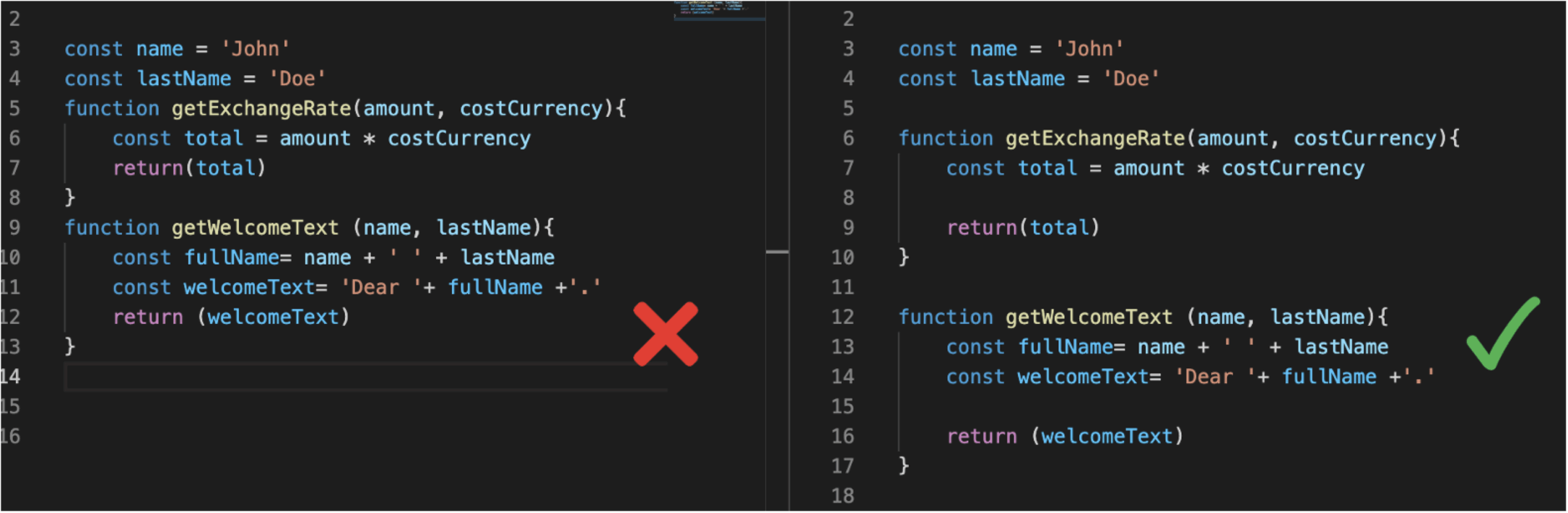
Another underrated secret is embracing whitespace and comments. In the heat of coding, it’s tempting to cram everything together, but that’s like writing a novel without paragraphs—exhausting. Use comments to explain your logic, especially in tutorials where you’re teaching others. And don’t forget about linting tools; they catch inconsistencies faster than I can spot a typo in my morning coffee order. By weaving these into your routine, you’ll create web code that’s not only clean but also a joy to revisit.
Step-by-Step Guide to Implementing Clean Code
If you’re ready to level up, here’s how to put these secrets into action. Start simple and build from there.
From concept to launch web project planning1First, audit your existing code: Go through your HTML and JavaScript files, identifying areas that are overly complex or poorly named. This step alone can reveal hidden issues, like redundant functions that bog down your site.
2Refactor with purpose: Take that messy function and split it into smaller ones. For instance, if you have a JavaScript event handler doing multiple jobs, isolate each task. It’s like decluttering a closet—everything has its place, making your web projects more efficient.
3Test as you go: Use tools like ESLint for JavaScript or HTML validators to ensure your code is clean from the start. This prevents the build-up of technical debt, which I’ve seen turn a simple tutorial into a maintenance nightmare.
Overcoming Common Pitfalls in Web Development
Sometimes, even with the best intentions, we slip up—maybe from rushing a deadline or getting lost in creative flow. In web tutorials, a common trap is overcomplicating animations or scripts, turning what should be elegant into a performance hog. Draw from cultural nods, like how memes poke fun at over-engineered solutions, to keep things light. Remember, clean code is about balance, not perfection. It’s that sweet spot where your site loads quickly, looks great, and doesn’t leave users scratching their heads.
Enhancing site speed with caching techniquesA Quick Dive into Advanced Techniques
For those deeper in the web dev rabbit hole, consider adopting design patterns like MVC (Model-View-Controller) to structure your code. This approach, which I first encountered while building a dynamic tutorial platform, keeps your logic separated from your views, making updates painless. It’s a game-changer for scalable web applications, ensuring your code remains clean as your projects grow.
As we wrap up this journey through the secrets of clean code, think about how these habits could transform your next web tutorial. What if your code was so intuitive that it inspired others to create without fear? That’s the real magic—turning lines of text into gateways of innovation.
FAQ
What is the most important rule for clean code in web development? The key is prioritizing readability and maintainability, like using meaningful names and modular structures, so your code feels like a conversation rather than a puzzle.
How does clean code improve SEO for web tutorials? By making your site faster and more efficient, clean code boosts page speed, which search engines love, ultimately helping your tutorials rank higher in results.
Personalizing user experiences onlineCan beginners easily adopt these secrets? Absolutely—start small with basic practices like commenting and organizing files; over time, it’ll become second nature, just like learning to ride a bike.