
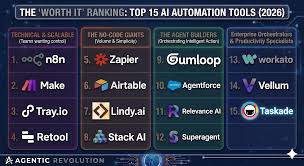
Artificial intelligence is changing the way businesses operate. Tasks that once required hours of manual work can now be automated with AI-powered platforms that connect apps, process data, generate content, analyze documents, respond to customers, and trigger workflows automatically.
For small businesses, startups, agencies, and enterprise teams, AI automation tools can reduce costs, improve productivity, and help teams focus on higher-value work.
In this guide, we compare the best AI tools for business automation in 2026, including features, pricing, strengths, and ideal use cases.
What Are AI Business Automation Tools?
AI business automation tools help companies automate repetitive tasks using artificial intelligence, workflow builders, integrations, and business logic.
How Much Does Managed Cybersecurity Cost for Small Businesses? (2026 Guide)These platforms can automate tasks such as:
- Email responses
- Lead routing
- CRM updates
- Invoice processing
- Customer support replies
- Data entry
- Report generation
- Document analysis
- Sales follow-ups
- Marketing campaigns
- Internal approvals
Traditional automation follows fixed rules. AI automation can understand text, classify information, summarize documents, generate responses, and make recommendations.
Why Businesses Are Investing in AI Automation
AI automation helps businesses solve common operational problems:
- Too much manual data entry
- Slow customer response times
- Repetitive admin work
- Disconnected software tools
- Missed sales follow-ups
- Inefficient reporting
- High operating costs
With the right platform, businesses can automate workflows across departments such as sales, marketing, finance, customer service, HR, and operations.
Best Identity and Access Management (IAM) Solutions for Enterprise SecurityBest AI Tools for Business Automation in 2026
1. Zapier
Best Overall AI Automation Platform for Small Businesses
Zapier is one of the most popular no-code automation platforms, connecting thousands of apps and helping businesses automate workflows without developers.
Zapier is especially useful for teams that need quick automations across tools like Gmail, Slack, HubSpot, Google Sheets, Shopify, Trello, Notion, and thousands of other apps.
Key Features
- No-code workflow builder
- AI-powered automation suggestions
- Multi-step workflows
- App integrations
- Chatbots
- Tables
- Interfaces
- Webhooks
- AI agents and assistants
Pros
- Very easy to use
- Massive app ecosystem
- Fast setup
- Good for non-technical teams
- Strong AI workflow features
Cons
- Costs can increase with task volume
- Complex workflows may become expensive
Pricing
Zapier offers a free plan and paid plans based on usage and features. Its pricing page highlights AI-powered chatbots and automation features, with annual billing discounts available.
Best For
Small businesses, agencies, founders, and teams that need simple AI automations across many apps.
Best Cyber Insurance Companies for Small Businesses in 20262. Make
Best Visual AI Workflow Builder
Make is a powerful automation platform known for its visual scenario builder. It is ideal for businesses that want more control over workflow logic than basic no-code tools usually provide.
Key Features
- Visual workflow builder
- App integrations
- Routers and filters
- API connections
- Data transformation
- AI app integrations
- Scheduling
- Error handling
Pros
- Highly flexible
- Visual workflow design
- Good for complex automations
- More affordable than many alternatives
- Strong for operations teams
Cons
- Slight learning curve
- Requires more planning than simple tools
Pricing
Make offers a free plan with up to 1,000 credits per month, and its Core plan starts at $12/month according to its official pricing page.
Best For
Operations teams, agencies, and businesses that need advanced visual workflows at a competitive price.
3. Microsoft Power Automate
Best for Microsoft 365 Businesses
Microsoft Power Automate is a strong automation platform for companies already using Microsoft 365, Teams, SharePoint, Outlook, Excel, Dynamics 365, and Azure.
Top CRM Software for Small Business Growth: Features and Pricing Compared (2026 Guide)It allows businesses to automate cloud workflows, desktop processes, approvals, and internal operations.
Key Features
- Cloud workflow automation
- Desktop automation
- AI Builder
- Microsoft 365 integration
- Approval workflows
- Robotic process automation
- Templates
- Business process automation
Pros
- Excellent Microsoft ecosystem integration
- Strong enterprise controls
- Useful for internal workflows
- Supports robotic process automation
- Good governance features
Cons
- Best value inside Microsoft environments
- Can be complex for beginners
Pricing
Microsoft lists Power Automate Premium at $15 per user/month and Power Automate Process at $150 per bot/month, billed yearly.
Best For
Businesses already using Microsoft 365 and enterprise teams that need controlled workflow automation.
4. UiPath
Best for Enterprise Robotic Process Automation
UiPath is one of the leading robotic process automation platforms for enterprises. It is designed to automate repetitive tasks across legacy applications, desktop software, web apps, and enterprise systems.
Key Features
- Robotic process automation
- AI document understanding
- Process mining
- Task mining
- Desktop automation
- Enterprise orchestration
- Attended and unattended bots
- AI-powered workflow automation
Pros
- Powerful enterprise automation
- Excellent for legacy systems
- Strong AI document processing
- Advanced governance
- Scales across large organizations
Cons
- More complex than no-code tools
- Usually requires technical implementation
Pricing
UiPath pricing is typically customized based on automation needs, bot usage, enterprise requirements, and support level.
Best For
Large businesses, enterprises, finance teams, insurance companies, healthcare organizations, and operations-heavy environments.
5. Workato
Best Enterprise Integration and Automation Platform
Workato is an enterprise automation platform focused on connecting business applications, data, workflows, and AI-powered processes.
It is often used by larger organizations that need secure, scalable, cross-department automation.
Key Features
- Enterprise workflow automation
- App integrations
- AI-powered automations
- Data orchestration
- API management
- Governance controls
- Security and compliance features
- Advanced workflow logic
Pros
- Strong enterprise capabilities
- Excellent integration depth
- Good governance and compliance controls
- Scalable across departments
Cons
- Higher cost than SMB-focused tools
- Best suited for mature automation programs
Pricing
Workato generally uses custom pricing based on business requirements, integrations, automation volume, and enterprise features.
Best For
Enterprises that need secure, scalable automation across multiple departments.
6. n8n
Best Open-Source Automation Platform
n8n is a flexible workflow automation platform popular with technical teams, startups, and businesses that want more control over automation infrastructure.
It can be self-hosted or used as a cloud service.
Key Features
- Open-source workflow automation
- Self-hosting option
- API integrations
- AI workflow support
- Custom JavaScript logic
- Webhooks
- Visual workflow builder
Pros
- Highly flexible
- Developer-friendly
- Self-hosting available
- Strong customization options
- Good for technical teams
Cons
- Requires more technical skill
- Not as beginner-friendly as Zapier
Pricing
n8n offers cloud and self-hosted options, with pricing depending on deployment and usage.
Best For
Developers, technical founders, startups, and companies that want control over automation infrastructure.
AI Automation Platform Comparison
| Platform | Best For | Main Strength |
|---|---|---|
| Zapier | Small businesses | Easy no-code automation |
| Make | Visual workflows | Flexible scenario building |
| Power Automate | Microsoft users | Microsoft 365 integration |
| UiPath | Enterprises | Robotic process automation |
| Workato | Large organizations | Enterprise integration |
| n8n | Technical teams | Open-source flexibility |
Common Business Use Cases for AI Automation
Sales Automation
AI tools can automate:
- Lead qualification
- CRM updates
- Follow-up emails
- Meeting scheduling
- Proposal generation
- Sales alerts
This helps sales teams respond faster and reduce manual admin work.
Marketing Automation
Marketing teams can use AI automation for:
- Content drafts
- Campaign reporting
- Email segmentation
- Social media workflows
- Lead nurturing
- Ad performance summaries
This improves campaign speed and consistency.
Customer Support Automation
AI can help support teams by:
- Answering common questions
- Routing tickets
- Summarizing conversations
- Drafting responses
- Escalating urgent issues
- Updating customer records
This reduces response times and improves customer experience.
Finance Automation
Finance teams can automate:
- Invoice processing
- Expense approvals
- Payment reminders
- Data extraction
- Monthly reporting
- Reconciliation workflows
AI document processing is especially useful for invoices and receipts.
HR Automation
HR teams can automate:
- Candidate screening
- Interview scheduling
- Employee onboarding
- Policy Q&A
- Leave requests
- Training reminders
This reduces repetitive administrative tasks.
Key Features to Look For
App Integrations
The best automation tool should connect with your existing software.
Look for integrations with:
- CRM platforms
- Email tools
- Spreadsheets
- Accounting software
- Project management apps
- E-commerce platforms
- Customer support tools
AI Capabilities
Useful AI features include:
- Text generation
- Summarization
- Classification
- Sentiment analysis
- Document extraction
- AI agents
- Chatbots
- Natural language workflow creation
Ease of Use
Non-technical teams usually benefit from platforms like Zapier or Make.
Technical teams may prefer n8n or custom API workflows.
Enterprise teams may need Workato, UiPath, or Power Automate.
Security and Governance
Businesses should evaluate:
- User permissions
- Audit logs
- Data encryption
- SSO support
- Compliance features
- Approval controls
- Admin visibility
Security becomes more important as automations touch customer data, finance systems, and internal operations.
Scalability
A tool that works for five workflows may not work for five hundred.
Consider:
- Workflow volume
- Task limits
- API limits
- Team access
- Error handling
- Enterprise support
How Much Do AI Automation Tools Cost?
Typical monthly pricing varies widely.
| Business Type | Estimated Monthly Cost |
|---|---|
| Solo business | $0–$30 |
| Small business | $30–$300 |
| Growing business | $300–$2,000 |
| Enterprise | Custom pricing |
Costs are usually based on:
- Number of tasks
- Number of users
- Workflow complexity
- Premium integrations
- AI usage
- Enterprise security features
Zapier vs Make vs Power Automate
Choose Zapier If:
- You want the easiest setup
- You use many SaaS tools
- Your team is non-technical
- You need fast automation deployment
Choose Make If:
- You need visual workflow logic
- You want more control
- You are cost-conscious
- You build complex scenarios
Choose Power Automate If:
- Your business runs on Microsoft 365
- You need approvals and internal workflows
- You want Microsoft ecosystem integration
- Governance is important
Best AI Automation Platform by Business Type
Best for Small Businesses
Zapier
Simple, fast, and widely integrated.
Best for Visual Automation
Make
Flexible workflows with strong visual control.
Best for Microsoft Teams
Power Automate
Best fit for Microsoft 365 environments.
Best for Enterprise RPA
UiPath
Excellent for automating repetitive enterprise processes.
Best for Enterprise Integration
Workato
Strong for complex cross-department automation.
Best for Technical Teams
n8n
Open-source flexibility and self-hosting control.
Common Mistakes to Avoid
Avoid these mistakes when adopting AI automation:
- Automating broken processes
- Ignoring data security
- Choosing tools based only on price
- Creating workflows without documentation
- Not monitoring automation errors
- Giving AI tools too much access too quickly
- Failing to train employees
AI automation works best when businesses start with clear, repeatable processes.
Final Thoughts
AI automation tools can help businesses reduce manual work, improve productivity, respond faster to customers, and scale operations without adding unnecessary headcount.
For most small businesses, Zapier is the best starting point because it is easy to use and integrates with thousands of apps. Make is ideal for more visual and complex workflows, while Microsoft Power Automate is the best choice for organizations already using Microsoft 365. Larger companies may benefit from enterprise platforms like UiPath and Workato, while technical teams may prefer the flexibility of n8n.
The best AI automation platform is not always the most advanced one. It is the platform that connects your existing tools, fits your team’s technical skill level, protects your data, and delivers measurable time savings across your business.